The useful part, up front
- Treat any unexpected message about a package, a missed delivery, or a payment problem as unverified until you check it another way.
- Verify by going directly to the carrier’s official website or app, or the store where you ordered, never through the link in the message.
- Pay with a credit card where you can, keep records, and report scams so others are protected. If you clicked, act quickly and in the right order.
Why delivery scams work so well
A fake delivery message usually has a simple structure. It says a package could not be delivered, an address is incomplete, a small fee is required, or a delivery is on hold. It includes a link. The sender is hoping you will click without thinking, because you are expecting a package, or you have several in transit and cannot remember all of them.
During the holiday season, the odds improve for the scammer. More packages are moving, more people are shopping on unfamiliar sites, and messages about shipping, returns, and gift orders feel normal. The combination of urgency and plausibility is what makes people click.
The goal of the link is usually one of three things: to steal your login details through a fake sign-in page, to collect your card number through a small fake fee, or to install something on your phone. Sometimes the first step is a conversation, such as a reply to the text that leads to a chat with a supposed customer service agent.
The good news is that these messages have recognizable patterns. You do not have to be an expert to avoid them, only to build a small habit of checking before you act.
Common versions of the scam to know
- The failed delivery text. “We couldn’t deliver your package. Confirm your address here.” The link goes to a lookalike site that asks for a card number to pay a “redelivery fee” of a dollar or two.
- The fake tracking or order email. A message that looks like it comes from a big retailer, saying an expensive item has been ordered on your account, with a phone number to call to cancel. The goal is to get you on the phone with a fraudster.
- The fake store. A website with famous brands at unbelievable prices, a recent domain, and no way to contact a real person. You pay and nothing arrives, or a cheap knockoff does.
- The gift card request. A message from someone who appears to be a boss, relative, or friend asking you to buy gift cards and send the codes. The account that sent it is often hacked or imitated.
- The fake charity. Donation requests are common at the end of the year. Scammers use names that resemble real charities.
- The bank or card alert. A message saying your card was used on a purchase, with a link or phone number to dispute it. If you call the number provided, you may reach a scammer.
- The refund or overpayment trick. A seller or buyer says they overpaid you and asks you to refund the difference, while their original payment is later reversed.
Our guide on how a convincing message can still be a trap goes deeper on the thinking behind these patterns.
Signs a message may be fake
No single sign proves it, but several together are a strong warning.
- It comes out of the blue, from a number or email you do not recognize, and you did not sign up for text updates.
- It asks you to pay a small fee, confirm personal data, or log in to an account, usually through a link.
- The link does not match the real company’s web address. Look for extra words, odd endings, misspellings, or shortened links. For example, a link that includes the carrier’s name but ends in a different domain is not the carrier’s site.
- It creates urgency: a short deadline, a threat of returning the package, or a claim of suspicious activity.
- It mentions an order you do not remember, or refers to you generically, such as “Dear customer.”
- The grammar, spacing, or formatting is slightly off, or the text asks you to reply with “Y” to activate the link. Replying to unknown numbers can mark your number as active and invite more messages.
A message can pass all these tests and still be fake, so the safest rule is not to rely on tests at all. Use a separate way to verify.
How to check a package without touching the link
Use this simple method whenever a message mentions a package.
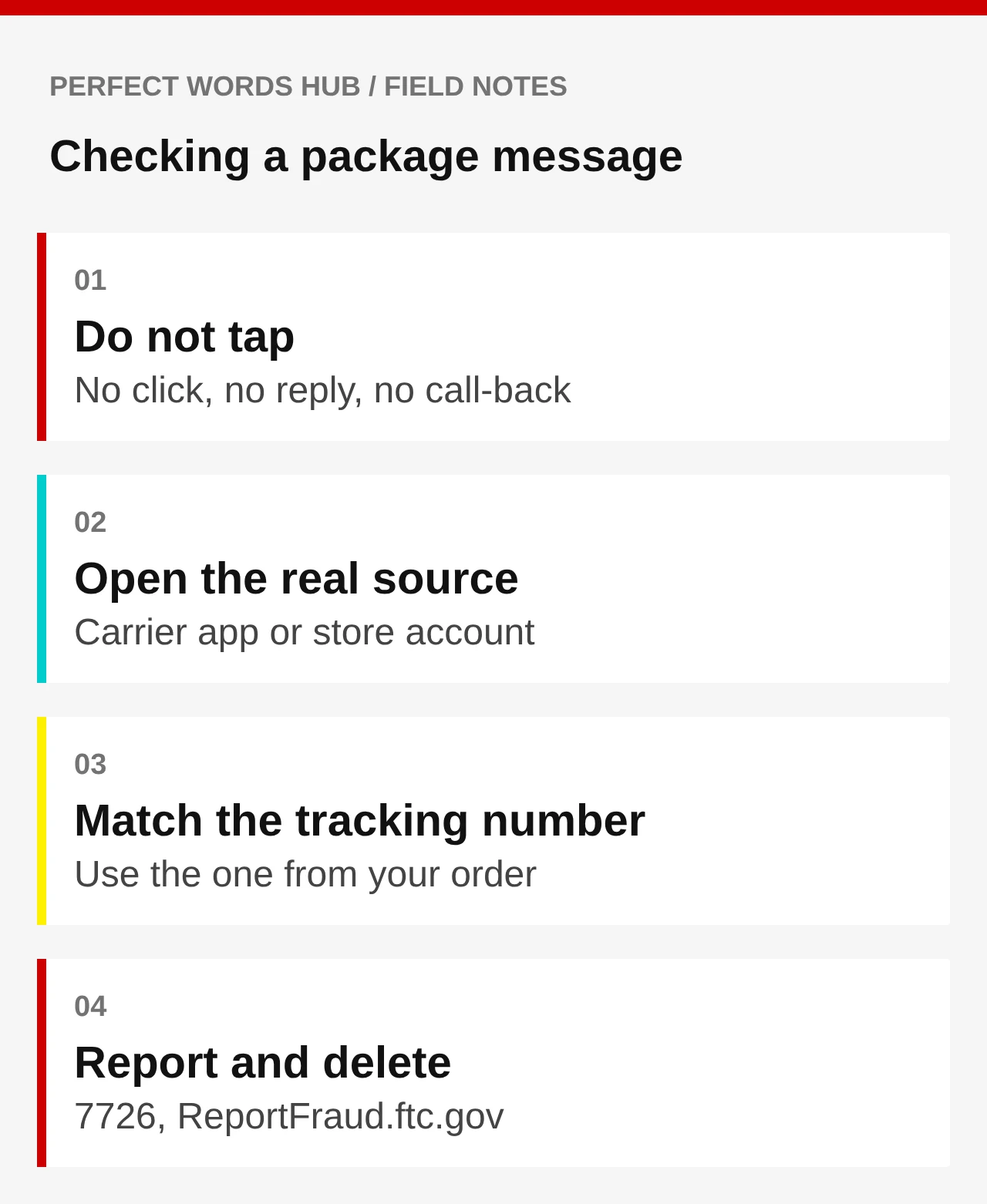
- Pause. Do not click, reply, or call a number in the message.
- Open the official source yourself. Type the carrier’s web address into your browser, or open its official app. For a store order, open the store’s own app or log in on its website. Look for the order or tracking number there.
- Use the tracking number you already have. If you ordered from a retailer, the confirmation email or account page lists a tracking number. Paste it into the carrier’s official tracking page.
- If nothing matches, assume the message is not real. Delete it. If you are unsure, call the number printed on the carrier’s or retailer’s official website, not the number in the message.
Many carriers have said they do not send unsolicited texts with links asking for payment to release a package. Check your carrier’s own help pages for how it contacts customers about a delivery, and for its way of reporting fake messages.
Shop in ways that limit the damage
The best protection is to make it hard for a mistake to cost much.
Use a credit card for online shopping. Under U.S. federal law, your liability for unauthorized credit card charges is capped at a low amount, and you can dispute billing errors with your card issuer. Debit cards, payment apps, wire transfers, and gift cards generally offer less recourse. Never pay a new seller using a gift card, wire transfer, cryptocurrency, or a peer-to-peer payment app. Those are favorites of scammers because they are hard to reverse.
Use a virtual or single-use card number if your bank offers one. If a merchant turns out to be fake, only that number is exposed.
Check unfamiliar stores. Look for a physical address, a working phone number, and reviews from sources outside the store’s own site. Search the store’s name plus “scam” or “reviews.” Check how long the domain has existed, and be wary of a brand-new site selling hard-to-find items at deep discounts.
Turn on transaction alerts. Get a text or push notification for every card purchase, so you notice fraud quickly.
Keep your own records. Save order confirmations and tracking numbers in one folder or note, so you can quickly tell a real message from a fake one.
Lock down the accounts scammers want
A successful scam often starts with a stolen login. Put a few protections in place before the busy season peaks.
- Use unique passwords, ideally from a password manager.
- Turn on multifactor authentication for email, banking, and shopping accounts. Passkeys, where supported, resist phishing better than a password. See our guide on what changes when you sign in with a passkey.
- Make sure your recovery information is current, so you can regain access if someone locks you out. Our guide on an account recovery plan can help.
- Keep your phone’s operating system and apps updated.
- Back up important data, in case a device is compromised. See a backup is only useful if you can get the files back.
If you already clicked or paid
Do not panic and do not delete evidence. Act in this order, and do as much as applies.
- Stop interacting. Do not reply, call back, or enter more information.
- If you entered a password, change it right away on the real site, and on any other site where you used the same one. Turn on multifactor authentication.
- If you entered card details or paid, call the number on the back of your card and tell the issuer. Ask to block the card, dispute the charge, and issue a new card. Monitor your statements.
- If you paid with gift cards, a payment app, or a wire transfer, contact the company that issued the card or the service right away. Time matters, although recovery is not guaranteed.
- If you think your phone is affected, run a security scan, remove apps you do not recognize, and consider a reset if something seems wrong. Update the operating system.
- Watch your accounts. Review credit reports for new accounts you did not open, and consider placing a fraud alert or credit freeze if your identity information was exposed. Credit freezes are free in the United States.
- Report it. See the next section.
Where to report, and why it matters
Reporting does not always get money back, but it helps investigators spot patterns and can help others avoid the same trap.
- Report scams to the Federal Trade Commission at ReportFraud.ftc.gov.
- Report internet crimes, especially those involving significant losses, to the FBI’s Internet Crime Complaint Center at ic3.gov.
- Forward scam text messages to 7726 (SPAM), which is a reporting shortcut used by major wireless carriers.
- Report phishing emails to the company being imitated, and to the Anti-Phishing Working Group at reportphishing@apwg.org.
- Tell your bank or card issuer, as described above.
Telling a friend or relative about what happened is also useful. Scammers often reuse the same message on many people, and a quick warning can stop someone from losing money.
A short family plan before the shipping rush
The best time to prepare is before an emergency. In five minutes you can set a few simple rules at home:
- Anyone who gets a package message checks it in the carrier app or store account before doing anything else.
- No one pays for anything with gift cards because of a message or call.
- Anyone who is unsure asks another person before sending money.
- Older relatives and teens are especially targeted. Share this checklist with them, kindly and without blame. Scammers are professionals, and anyone can be fooled when they are tired or busy.
Scams change, but the habit does not: pause, verify through a separate channel, and use payment methods that you can dispute.
Sources & further reading
- FTC: Report fraud
- FTC Consumer Advice: How to recognize and avoid phishing scams
- FBI Internet Crime Complaint Center (IC3)
- CISA: Secure Our World
- USPS Postal Inspection Service: Fake delivery notifications
Source links checked October 17, 2026. Rules, rates and product terms can change.
General online safety education. Check official sources and your own institutions for current guidance.